Projects
6 projects: the problem each one started from, the decisions behind it, and what changed as a result.
01 06
ICARUS-Lite
Industrial Design
A compact, purpose-built industrial printer designed to automate prosthetic and orthotic production with minimal customer setup.
Project page under development. More details to come soon.
- Achieved a bolt-less shell with seamless chamfered geometry that gives homage to the POSEIDON, one of the largest mass-produced 3D printers I designed while at Filament Innovation.
- Created an IEEE-style electrical design adaptable to 120/240 VAC and completed product changes supporting conformity with the 2006/42/EC machinery directive.
6 images · click to enlarge
02 06
ExtrusionStudio
Plant Data Acquisition / Python, Modbus TCP, Raspberry Pi
A plant-wide measurement and production system for filament extrusion lines. One server reads every line's tri-axial laser gauge over Modbus TCP, charts it live, logs every spool, prints its labels and certificate, and runs the screens around the plant on Raspberry Pis.
It began as a LabVIEW proof of concept that established the Modbus communication. Once that worked, I rebuilt the whole program from scratch in Python so it could keep up with faster production, add a calibration step that makes each spool's record accurate, and take control of every device on the floor: the lines' screens, the projector and the TVs power on an hour into the workday and off at the end of it.
- Replaced three LabVIEW executables polling one line each with one Python service that reads every line concurrently at 20 Hz, so a powered-down line never stalls the others.
- Added a calibration phase that times the filament from the laser to the spool, a delay of one to two minutes through the accumulator, so each reading and alarm lands on the spool it is actually wound on.
- Every spool gets a CSV, a serial, a QR label and an HTML certificate; the packing bench approves, inspects or rejects it and prints spool, box and master case labels.
- Raspberry Pi kiosks run the projector, a touch screen per line, the packing bench and a statistics TV, and the server switches them on and off with the work hours, pairing with the TV over the network.
4 images · click to enlarge
A tour of the panels
Everything runs on one server. Each panel is a page it serves, and each screen around the plant is a Raspberry Pi that only displays one of them. Step through them in the order the plant uses them, from the operator at the line to the people looking after the server. Every capture is from the program's own simulator with made-up spools; no plant data is on this site.
01061 of 6
Operator-GUI
The operator, one touch screen per line
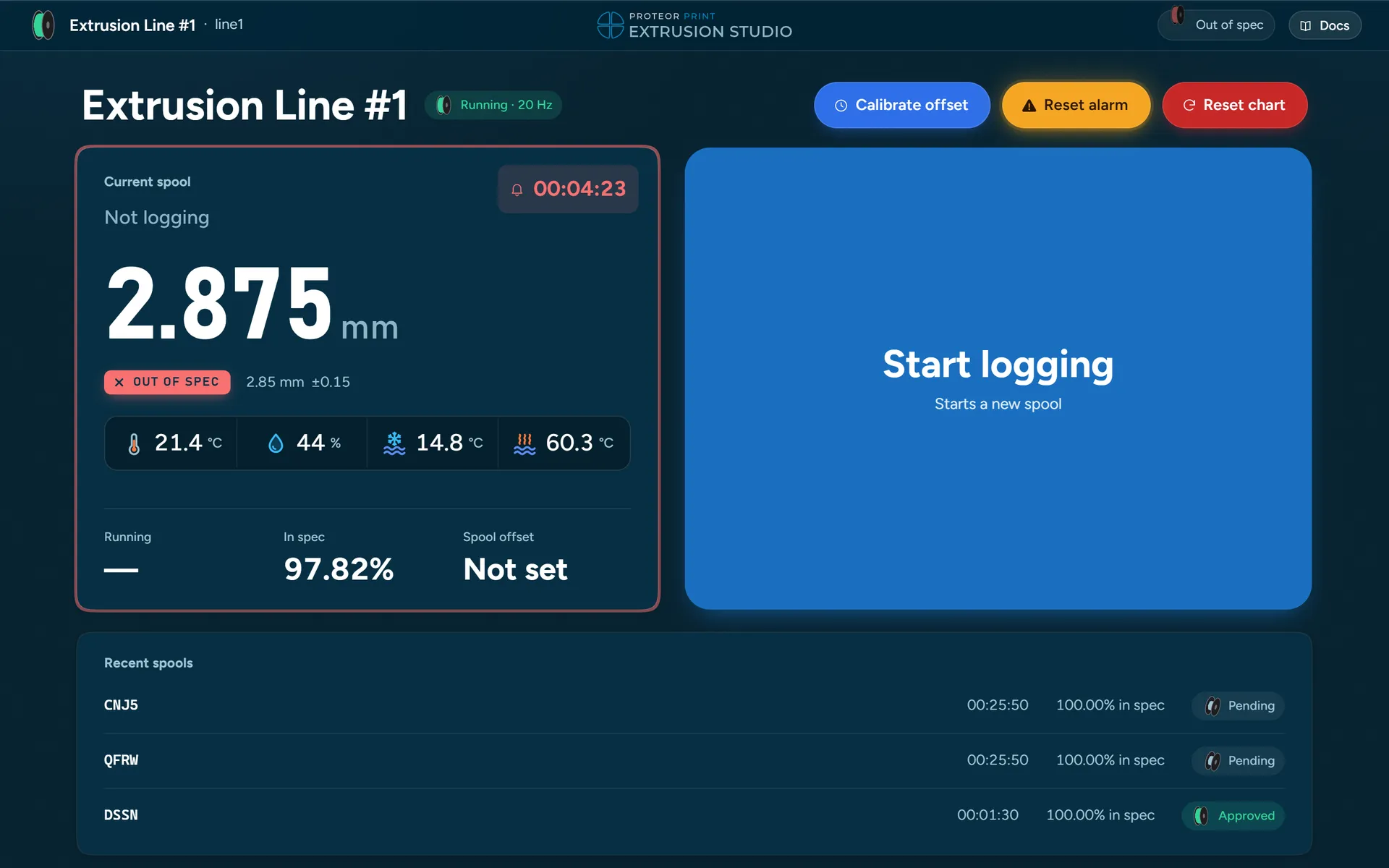
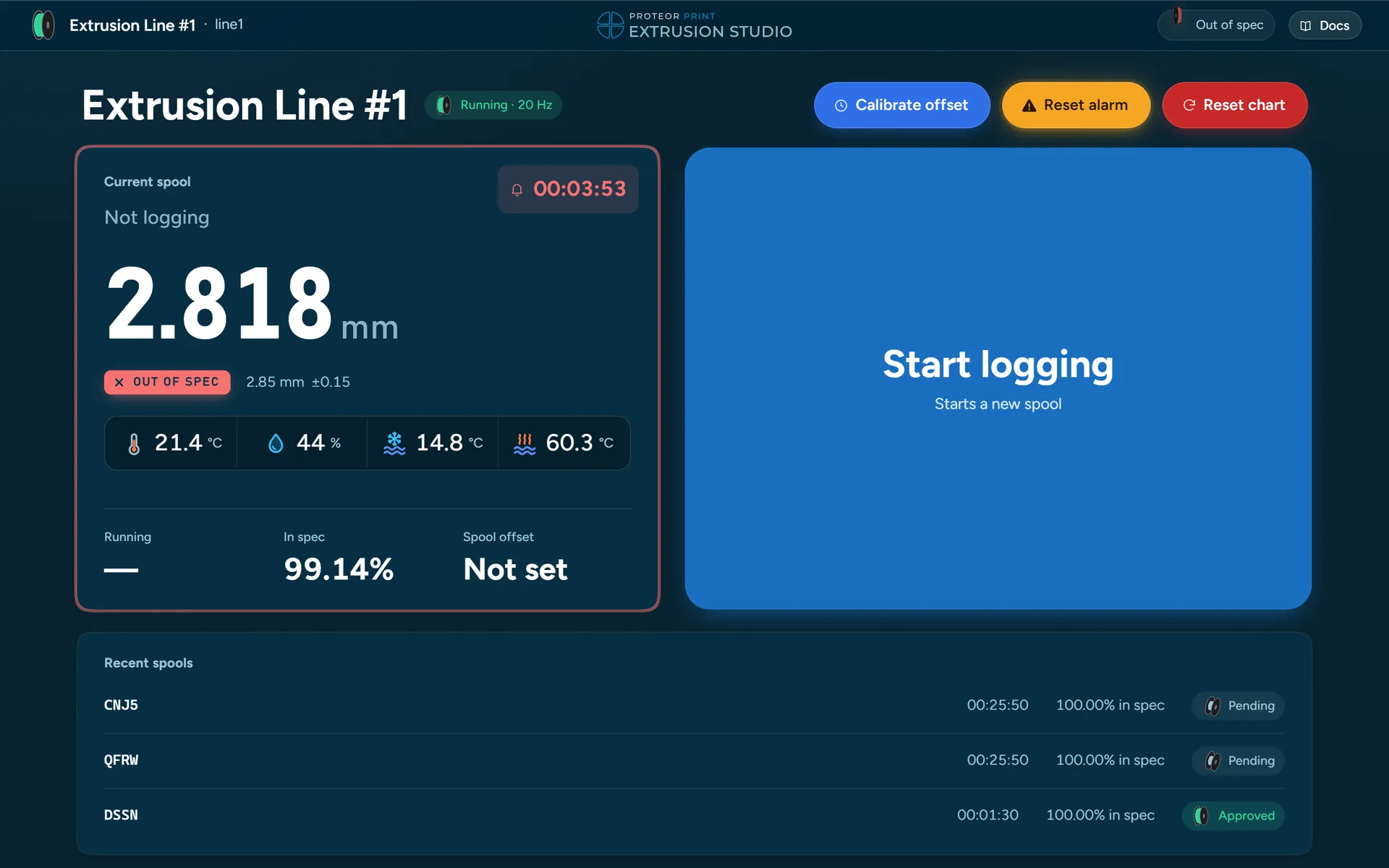
This is how the operator controls each line on its own. The screen is locked to its line, so there is nothing to choose: the live diameter, whether it is in spec, and the three things an operator does. Start logging opens a spool; Next spool closes it and opens the next; Stop logging ends the run.
Calibrate offset is the calibration phase. A countdown ends, the operator marks the filament at the laser, and presses stop when the mark reaches the spool. From then on every reading is logged that many seconds late, so it lands on the spool it is physically wound onto rather than the one that was on the winder when the laser saw it.
On this screen
What the program writes
Three files from one short spool in the simulator, exactly as the program wrote them, with made-up readings and a made-up serial. The real plant's data stays on the plant's server.
03 06
 BulkSSH
Windows Desktop App / TypeScript, Electron
A Windows app for working with many SSH devices at once: servers, Raspberry Pis, routers and switches. Add a list of addresses, enter the username once, and every device opens in a grid of live terminals.
I built it to speed up testing the ExtrusionStudio deployment, where every change to the Pi image had to be tried on every Pi. Mirrored keystrokes type into every ticked device, and a broadcast runs one command on all of them and shows each one's output and exit code.
- Grid of live terminals, paged when there are more devices than fit, with a full-size focus view for vim and top.
- Risky commands such as reboot or rm -r need confirming before they reach several devices, and host keys are never accepted silently.
- Saved passwords are optional and encrypted with the Windows account; dropped connections reconnect by themselves.
Click to enlarge
04 06
RB's Auto App Updater
Windows Utility / PowerShell
A one-line install that puts an App Auto Updater shortcut on a Windows desktop. It checks every installed application with WinGet, shows what can be updated, and upgrades each package on its own so a single failure never stops the rest.
Install using this powershell command:
irm https://www.rileybeenders.com/AutoWinUpdater | iex- Runs the upgrades through an elevated scheduled task, so after the one-time setup the desktop shortcut updates everything without a UAC prompt.
- Translates WinGet exit codes into plain-language statuses such as security blocked, manual update, restart needed, and application in use, and retries per-user installers without elevation.
- Keeps itself current: every launch checks a version manifest on GitHub, downloads the newer script, and verifies its SHA-256 hash before installing.
Click to enlarge
05 06
Unified Ubiquiti Network
Network Infrastructure
A series of cloud gateways that I have been setting up across our company, my personal home and my parents house. The setup shown in the before vs after is the "Proteor" network. My first deployment of a Unifi gateway that was recently reworked after adding cables over the past few years.
The "Proteor" network is planned to get an upgrade into the Fortinet system as our needs internally are growing.
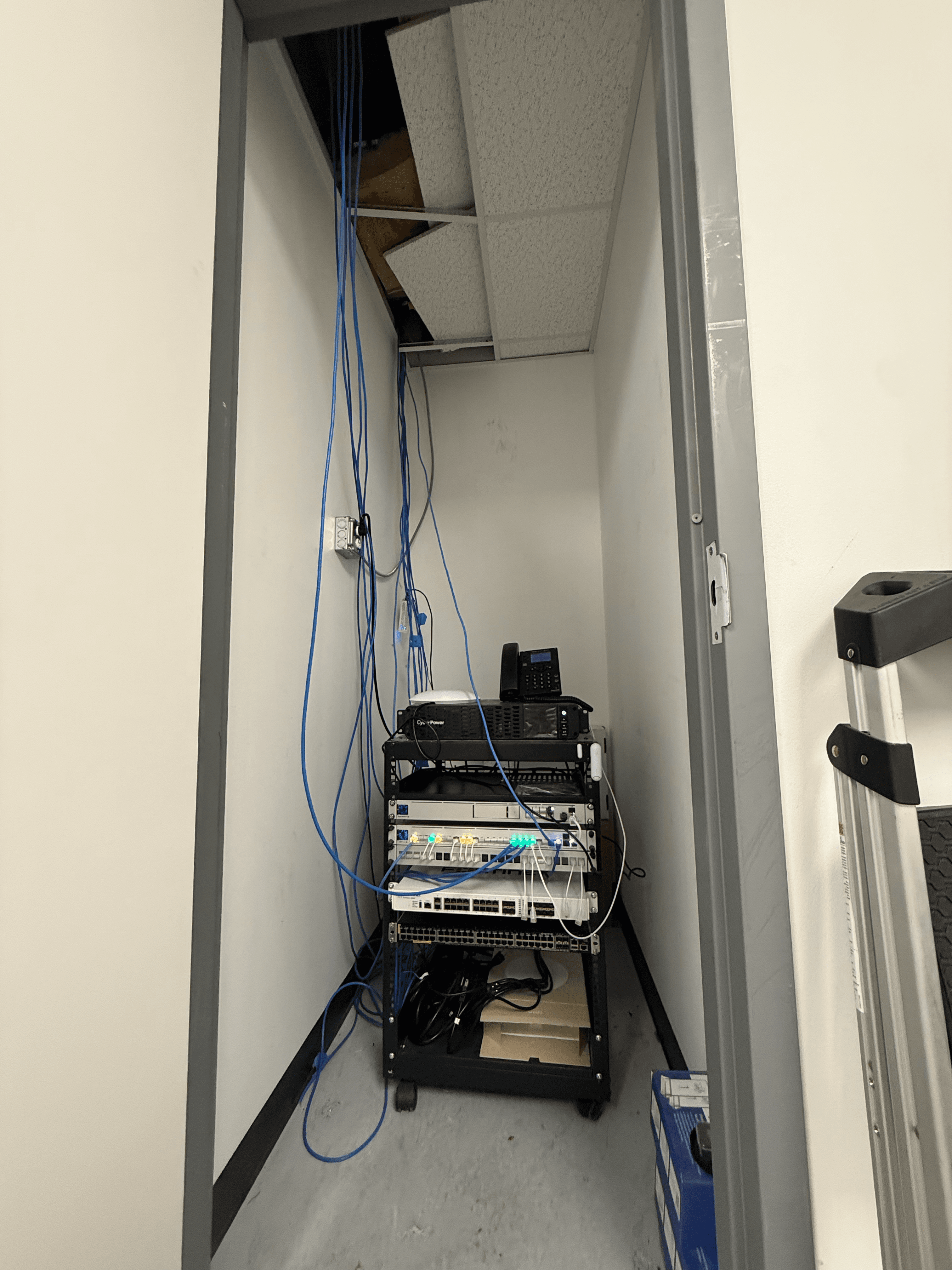
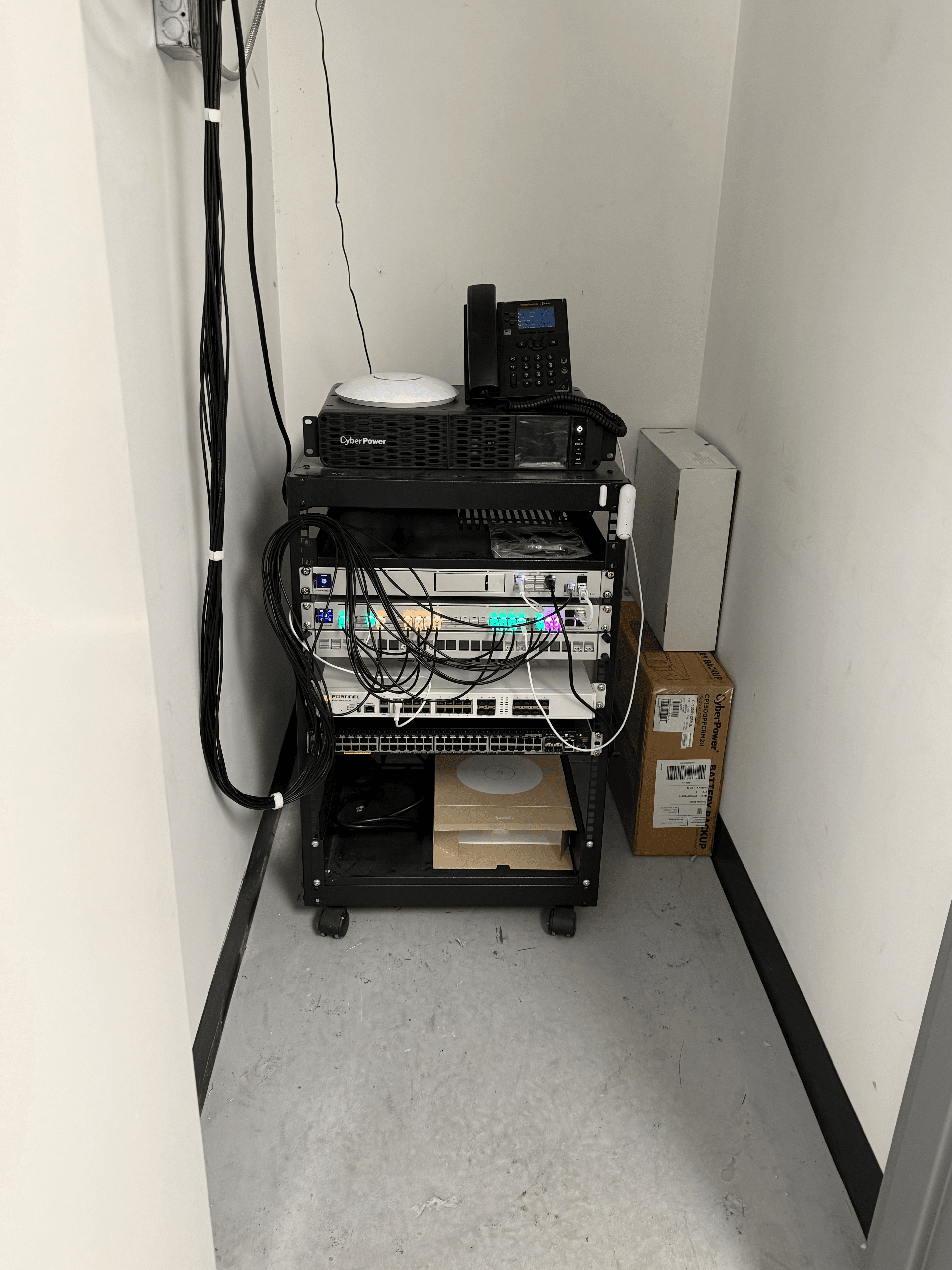
2 images · click to enlarge · drag to compare
06 06
Filament Innovations Projects
Industrial Design
Some photos of the various machines I designed during the first few years being at Filament Innovations. Throughout this process, I held the following titles: Engineering Technician, Industrial Engineer and eventually Lead Electro-Mechanical Engineer.
These are very old designs. I would look into the ICARUS-Lite as it is the most recent design.
Documentation on the POSEIDON is coming soon
5 images · click to enlarge